

Simplify your WordPress workflow!
Build faster, cleaner, and more reliable WordPress websites using lightweight plugins designed for real-world workflows.
Get started now
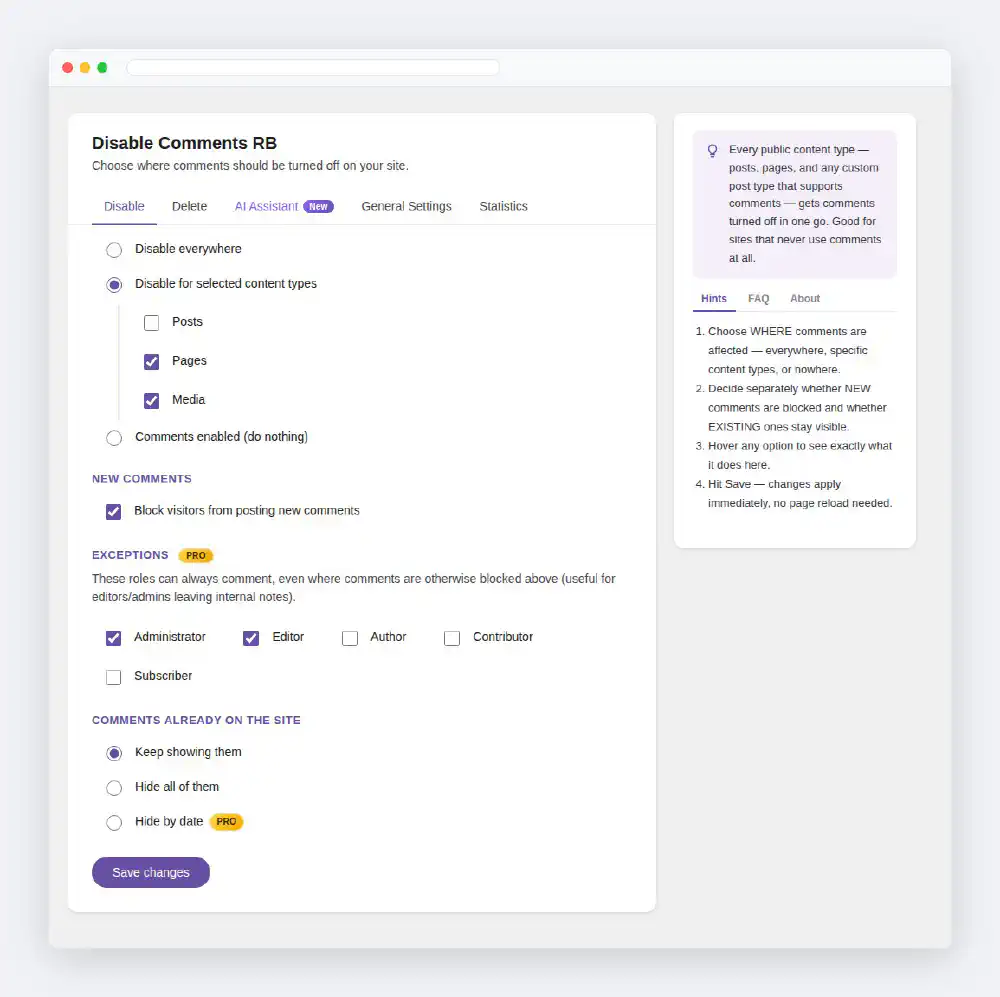
Disable Comments RB gives you real control over WordPress comments instead of a single on/off switch. Choose which content types lose comments, decide separately whether visitors can post new ones and whether the old ones stay visible, and clean up what is left with a bulk delete that counts before it removes anything.
The free plugin covers disabling, hiding, deleting, spam-channel blocking and statistics. The optional PRO add-on adds the AI Assistant for automatic replies, WooCommerce review tools, date and role rules, Multisite enforcement, export/import and WP-CLI.
Or download the plugin from WordPress.org and upload the disable-comments-rb folder to /wp-content/plugins/.
Nothing changes on your site until you save the settings: a fresh install leaves comments exactly as they were and shows a notice that links to the settings screen.
Hover any option on the settings screen to read what it does in the panel on the right.
| Feature | Free | PRO |
|---|---|---|
| Disable comments everywhere or on selected content types | ✓ | ✓ |
| Block new comments and hide existing ones, independently | ✓ | ✓ |
| Bulk delete or trash by content type and status, with Count first | ✓ | ✓ |
| Block comments sent through XML-RPC and the REST API | ✓ | ✓ |
| Statistics tab and Dashboard widget | ✓ | ✓ |
| Comments page and toolbar shortcuts, top-level menu option | ✓ | ✓ |
| AI Assistant: automatic replies by keywords, with presets | ✓ | |
| WooCommerce reviews: replies by star rating, delete and statistics apart from comments | ✓ | |
| Hide existing comments by date | ✓ | |
| Delete by date and by comment type | ✓ | |
| Role-based exceptions for staff | ✓ | |
| Multisite: enforce the settings network-wide | ✓ | |
| Export and import settings | ✓ | |
| WP-CLI commands | ✓ |
See pricing for licenses.
PRO is a small separate plugin, Disable Comments RB — PRO Key, that works on top of the free plugin. There is no license key to type in: having the PRO Key active is the unlock.
Your settings stay where they are if you deactivate the PRO Key; the PRO features simply stop working until it is active again.
Version 2 keeps your old choices: the content types you disabled and the “everywhere” setting carry over, and existing comments stay hidden on those types, as they were in 1.0.x. The new Dashboard widget and toolbar item stay off on updated sites until you turn them on under General Settings.
Build faster, cleaner, and more reliable WordPress websites using lightweight plugins designed for real-world workflows.
Get started now