Share your feature requests anytime
Search icon Our Plugins

Duplicate page hierarchy

Overview

Duplicate Post RB can copy a page together with all its child pages, at every level, as a new tree of its own. It is handy for a section of a site — a group of landing pages, a part of the documentation — that you need again.

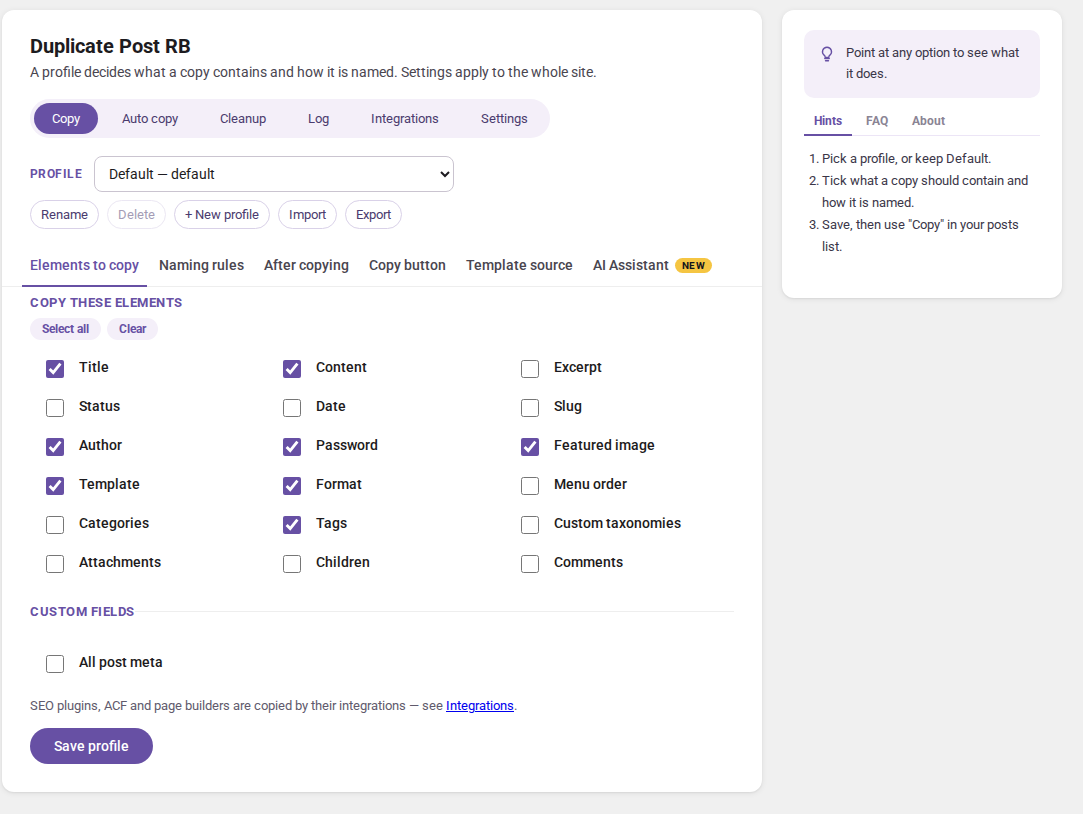
This is the Children option in a profile’s Elements to copy.


Switch it on

  1. Open RB Plugins → Duplicate Post → Copy
  2. Pick the profile — or make a new one, e.g. “Whole section”
  3. In Elements to copy, tick Children
  4. Click Save profile

From then on, every copy made with this profile takes the children with it — from the pages list, the editor, the admin bar, the bulk action or WP-CLI. To copy a parent alone once, untick Children in the copy dialog’s Advanced settings.


What is copied

  • The parent and all its descendants, at every level.
  • Each child is copied with the same profile: the same elements, naming rules and Assistant steps.
  • The copies form a new tree: each child copy hangs under the copy of its parent. With Menu order ticked too, the children keep their order.
  • Children of any status are copied, except those in the trash. Media attachments and revisions are not children in this sense and are not copied as such.

Good to know

  • A user copies only the children they may read — the others are left out, and the copy dialog says how many.
  • A child that could not be copied is reported too; the rest of the tree is copied.
  • Posts whose parents point at each other in a circle are copied once, never in an endless loop.
  • Only hierarchical post types (pages and similar custom types) have children.
  • Use a profile of its own for whole trees, so that an everyday copy of a page does not take a large section with it.

Next steps

Simplify your WordPress workflow!

Build faster, cleaner, and more reliable WordPress websites using lightweight plugins designed for real-world workflows.

Get started now