

Simplify your WordPress workflow!
Build faster, cleaner, and more reliable WordPress websites using lightweight plugins designed for real-world workflows.
Get started now
The AI Assistant tab replies to new comments for you. A comment that asks about price, delivery or a problem gets an instant answer from a template you write, instead of waiting for manual moderation. On WooCommerce stores, rules can also catch low-rated product reviews.
The AI Assistant is part of PRO.
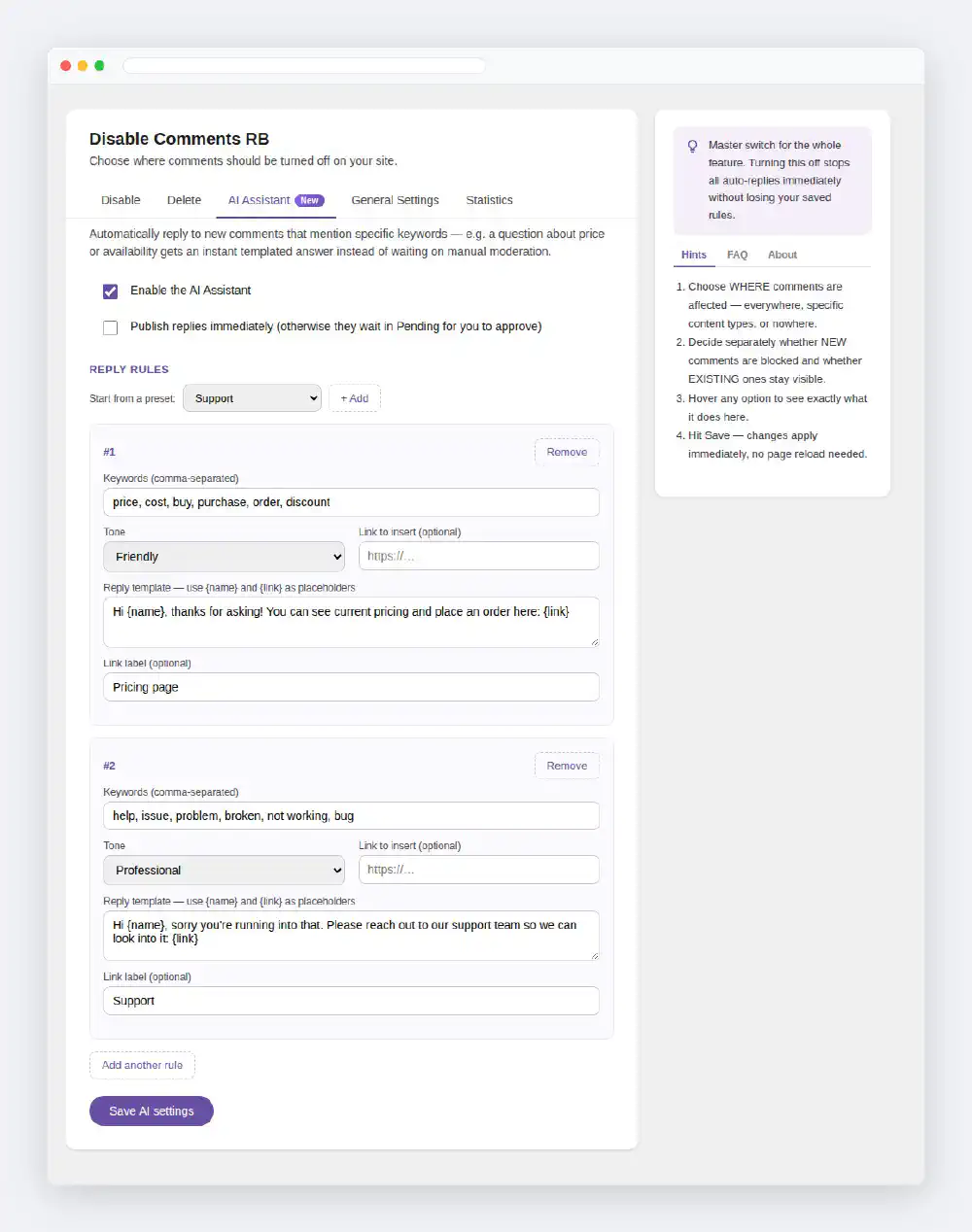
Enable the AI Assistant
The master switch. Turning it off stops all automatic replies at once; your rules are kept.
Publish replies immediately
Under Start from a preset, pick a scenario and click + Add. Each preset adds one ready-made rule to the list — picking two presets gives two rules.
| Preset | Keywords | Reply |
|---|---|---|
| Sales | price, cost, buy, purchase, order, discount | points to your pricing page |
| Support | help, issue, problem, broken, not working, bug | points to your support page |
| Availability / Shipping | availability, in stock, shipping, delivery, when will | points to stock and delivery details |
| Complaints | refund, complaint, disappointed, unhappy, cancel | asks the commenter to contact you |
| Negative product reviews | — (1- and 2-star reviews) | asks the reviewer to contact you; shown when WooCommerce is active |
Edit the keywords, the template and the link of each rule to fit your site.
Each rule has these fields:
Keywords (comma-separated)
Case-insensitive and matched inside words — price also matches pricing. A comment needs to contain only one of the keywords to trigger the rule.
Tone
Friendly, Professional or Casual — a label that helps you keep track of the style of each template.
Reply template
The text of the reply. {name} becomes the commenter’s name and {link} becomes the link from the fields below. Markup in a commenter’s name never reaches the reply.
Link to insert and Link label
Optional. The URL and the text used for {link}.
Applies to
Comments & reviews, Product reviews only or Regular comments only. Product reviews only makes sense with WooCommerce active.
Only trigger for star rating ≤
Set above 0 to also require a low rating — for example 2 means the rule fires only on 1- and 2-star reviews. Combine it with keywords, or leave the keywords empty to answer every low-rated review whatever its wording.
Rules are checked from top to bottom and only the first matching rule replies, so put the most specific rules first. Use Add another rule and Remove to manage the list, then click Save AI settings.
Build faster, cleaner, and more reliable WordPress websites using lightweight plugins designed for real-world workflows.
Get started now